Applies To
You can’t split an individual cell, but you can make it appear as if a cell has been split by merging the cells above it.
Merge cells
1.Select the cells to merge.
2.Select Merge & Center,then Merge Cells.
Important: When you merge multiple cells, the contents of only one cell (the upper-left cell for left-to-right languages, or the upper-right cell for right-to-left languages) appear in the merged cell. The contents of the other cells that you merge are deleted.
Unmerge cells
1.Select the Merge & Center down arrow.
2.Select Unmerge Cells.
Important:
- You cannot split an unmerged cell. If you’re looking for information about how to split the contents of an unmerged cell across multiple cells, see below.
- After merging cells, you can split a merged cell into separate cells again. If you don’t remember where you have merged cells, you can use the Find command to locate merged cells quickly.
Distribute the contents of a cell into adjacent columns
Applies ToWindowsWeb
You can divide the contents of a cell and distribute the elements into multiple adjacent cells. For example, if your worksheet contains a column Full Name, you can split that column into two columns—a First Name column and Last Name column.
Tips:
- For an alternative method of distributing text across columns, see the article, Split text among columns by using functions.
- You can combine cells with the CONCAT function or the CONCATENATE function.
Follow these steps:
Note: A range containing a column that you want to split can include any number of rows, but it can include no more than one column. It’s important to keep enough blank columns to the right of the selected column, which will prevent data in any adjacent columns from being overwritten by the data that is to be distributed. If necessary, insert a number of empty columns that will be sufficient to contain each of the constituent parts of the distributed data.
- Select the cell, range, or entire column that contains the text values that you want to split.
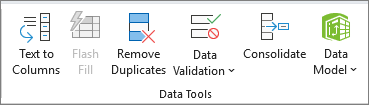
- On the Data tab, in the Data Tools group, select Text to Columns.
- Follow the instructions in the Convert Text to Columns Wizard to specify how you want to divide the text into separate columns.
 EasetipsNtricks